

Most small businesses don't lose customers over bad products. They lose them over bad experiences — a slow reply, a canned response that ignored the actual question, a moment where the customer felt like a ticket number instead of a person.
So when someone suggests adding AI to your customer support, the worry is fair: what if we make that problem worse?
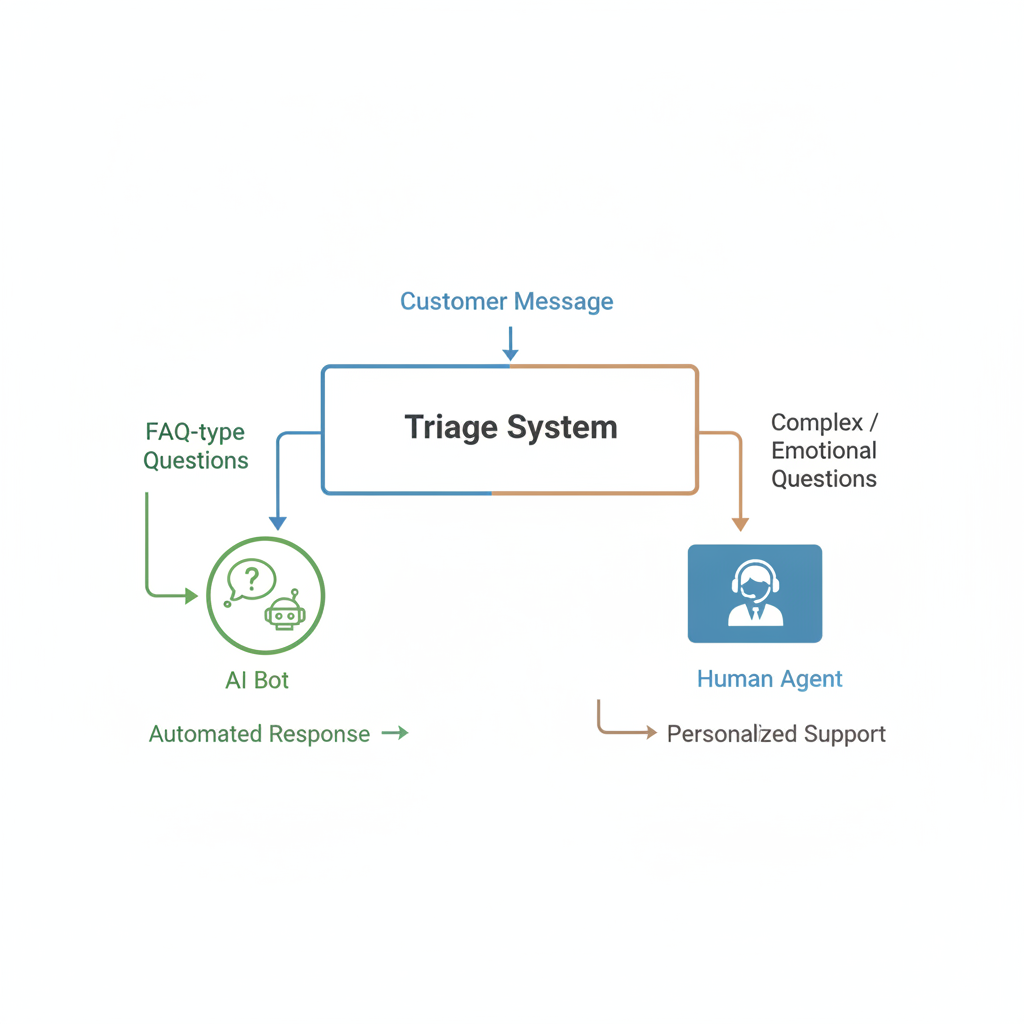
Used well, AI doesn't have to. The key is knowing exactly which parts of your support workflow AI can handle better than a human — and which parts it will absolutely botch if you let it try.
Here's how to think through it.
Where AI Actually Earns Its Place in Support
Drafting replies your team then reviews and sends
This is the highest-ROI use for most small businesses, and it's underused.
Your support rep opens a ticket. Instead of staring at a blank reply box, they get a drafted response — one that's already pulled in the customer's name, references what they asked, and matches your standard tone. The rep reviews it, edits if needed, hits send. What used to take four minutes takes forty-five seconds.
Tools like Zendesk's AI features, Help Scout's AI Summarize and Assist, or even a well-prompted ChatGPT connected to your inbox can do this. You're not automating the response — you're accelerating a human one. The rep is still the one who sends it. That distinction matters.
Answering true FAQs without human involvement
If a question has one correct answer that never changes — "What's your return window?" "Do you ship to Canada?" "How do I reset my password?" — there is no good reason a human should be typing that answer a hundred times a month.
A well-built FAQ bot (or a support widget trained on your documentation) can handle these confidently, instantly, at 2 a.m. when your team is asleep. Customers get the answer faster. Your team saves real hours.
The catch: "true FAQs" is a smaller category than most businesses assume. As soon as the question has any nuance — "Can I return this even though I've opened it?" — you need a human or at least a clear escalation path. More on that below.
Summarizing long ticket threads
A customer has emailed back and forth with your team six times over two weeks. A new rep picks up the thread. Without AI, they have to read all six messages to understand the situation. With AI, they get a three-sentence summary: "Customer ordered size M, received size S, was offered an exchange, exchange shipped but tracking hasn't updated in five days. Customer is frustrated."
This saves time and, more importantly, prevents the maddening experience where a customer has to re-explain their whole situation because a new person picked up the ticket.
Routing and tagging
AI can read an incoming message and route it correctly — billing issues go to billing, technical questions go to tech support, shipping problems go to fulfillment — without a human triaging it first. It can also tag tickets automatically so your team can filter and prioritize.
This sounds unglamorous, but routing delays are one of the most common sources of customer frustration. A ticket that lands in the right queue immediately gets answered faster.
Where You Must Keep a Human in the Loop
Anything with real emotion behind it
A customer whose order was lost right before a wedding. A small business owner who's panicking because your software is down and they have a client presentation in two hours. Someone who's clearly had a rough day and is taking it out on your support team.
AI cannot read emotional weight reliably. It will often respond to distress with cheerful efficiency, which is almost worse than saying nothing. These situations need a human who can slow down, acknowledge what's happening, and respond like a person — not like a help desk ticket.
This is the failure mode nobody talks about enough: AI isn't just wrong sometimes, it's wrong in ways that feel cold. And in high-emotion moments, cold is the worst possible thing to be.
High-stakes decisions
Refund above your standard threshold. An exception to policy. A customer threatening to churn or go public with a complaint. A situation where someone might have a legitimate legal grievance.
These need judgment, authority, and accountability — things AI doesn't have. Even if an AI could draft a reasonable response, a human needs to own the decision.
Anything unusual or outside the pattern
AI is trained on patterns. When a situation is genuinely novel — an edge case your documentation doesn't cover, a complaint that doesn't fit any category, something that requires creative problem-solving — AI will either make something up (confidently wrong) or give a vague non-answer. Neither is acceptable.
Train your team to recognize the "AI hedging" pattern: responses that are long, technically plausible, but don't actually answer the question. That's the signal to step in.
Relationship-critical accounts
If you have customers who represent significant revenue, or where the relationship itself is part of the value you provide, AI-mediated support is a downgrade they'll notice. High-value clients should feel like they have a person, not a system.
How to Set This Up Without Wrecking Your Support Culture
Start with assist, not automate. The first phase should be AI helping your team respond faster — not AI responding instead of your team. Get your team comfortable with the tools, let them see when the drafts are good and when they need editing, and build trust in the system before you widen its autonomy.
Write real escalation triggers. Don't leave it to AI to decide what's "too complex." Build explicit rules: certain keywords (refund, cancel, legal, complaint, frustrated, urgent) automatically flag for human review. Dollar amounts above a threshold go to a human. Any ticket from a customer marked "VIP" goes straight to a person.
Audit the AI replies regularly. Set aside thirty minutes a month to read a random sample of what your AI-assisted support actually sent. You will catch drift — tone getting too formal, incorrect information, situations that slipped through that shouldn't have. This is not optional if you care about quality.
Tell customers what they're dealing with. If a customer is chatting with a bot, say so. "Hi, I'm an automated assistant — I can help with most questions, but I'll connect you with someone on our team if I can't." Customers don't hate bots; they hate being deceived into thinking they're talking to a human. Transparency here costs you nothing and saves you real trust.
Keep your team in the loop on what AI is doing. If reps feel like AI is being used to monitor or replace them, you'll lose team buy-in fast. Frame it honestly: this is about getting the boring-but-necessary parts off your plate so you can focus on the interactions that actually require you.
A Realistic Picture of What to Expect
If you implement AI support assist thoughtfully — drafting, FAQ handling, routing, summarization — a realistic outcome for a small business with one or two support reps might look like:
- 30–50% reduction in time spent on repetitive FAQ-type tickets
- Faster first-response times, especially outside business hours
- Fewer errors from reps who are rushed or context-switching
What it won't do: make your customers feel better cared for if you cut too many humans out. Support quality is not just about speed; it's about whether a customer hangs up (or closes the chat) feeling heard. That part is still entirely human.
This is the kind of support audit — figuring out exactly where the leverage points are and where the risks are — that we work through with clients before recommending any tooling. There's no point automating the wrong things.
The Bottom Line
AI has genuinely useful jobs to do in small business customer support. Draft replies. Handle true FAQs. Summarize threads. Route tickets. Those are real time savings with low risk of damaging the customer relationship.
But the job of being a person — hearing frustration, making judgment calls, owning a decision, treating a high-stakes customer like they matter — that's not something to hand off. Not yet, and maybe not ever.
The businesses that get this right are the ones who use AI to give their people more capacity for the human parts, not less.
If you want to think through where AI fits in your specific support workflow — what to automate, what to protect, and what tools are actually worth it for a business your size — let's talk. No pitch, just a practical conversation.