

There's a specific kind of frustration that comes with working with AI tools long enough: the moment you realize a confident, well-written, completely plausible answer was just wrong.
Not vague. Not hedged. Wrong — stated with the same smooth authority as everything else the tool has ever told you.
If you've experienced this, you're not using AI incorrectly. You've just run into the thing the industry calls hallucination, and it's the single most important concept to understand before you put AI anywhere near a real business process.
This article explains what's actually happening, where it matters (and where it doesn't), and how to build a simple catch layer so that a wrong output never reaches a customer, a contract, or a filing.
What "hallucination" actually means
The term is a bit dramatic, but it stuck because it's accurate: the AI isn't lying to you, and it isn't confused the way a tired employee might be confused. It's doing something stranger.
Large language models — the technology behind ChatGPT, Claude, Gemini, and most AI writing tools — work by predicting what text should come next based on patterns learned from enormous amounts of written material. They are, at the core, very sophisticated pattern-completion engines.
That architecture makes them extraordinarily capable at generating fluent, contextually appropriate text. It also means they have no internal fact-checker. When the model doesn't "know" something — or when the correct answer sits outside its training data — it doesn't stop and say so. It continues generating plausible-sounding text, because that's what it does. The result is an answer that looks right: correct sentence structure, appropriate tone, confident phrasing — and fabricated content.
The AI isn't aware it's doing this. There's no internal alarm that fires when it crosses from known into invented. That's the part that catches people off guard. A hallucinated statistic reads exactly like a real one. A made-up legal citation looks exactly like a valid one. A fabricated product specification looks exactly like one you might find on a data sheet.
Why this matters more in some places than others
Not every wrong AI output is a crisis. Part of using AI practically is knowing which category you're in.
Where mistakes are cheap:
- First-draft marketing copy that a human rewrites anyway
- Internal brainstorming lists no one acts on without discussion
- Meeting agenda suggestions
- Social media captions that get reviewed before posting
- Rough summaries of documents you already know well
In these cases, an AI error is annoying at worst. You or someone on your team will catch it before anything happens. The cost of a wrong answer is a few minutes of correction time.
Where mistakes are expensive:
- Client-facing documents: proposals, quotes, contracts, reports
- Anything with numbers: financial summaries, pricing, calculations
- Regulatory or legal content: compliance filings, HR policies, terms of service language
- Medical, safety, or technical specifications
- Emails sent on your behalf to customers or vendors
- Anything referencing specific facts: dates, names, statistics, citations
In these categories, a hallucinated detail doesn't just waste your time — it can damage a client relationship, create legal exposure, or go into a filing that's hard to retract. The AI doesn't know the difference between a low-stakes brainstorm and a contract addendum. You have to — and some tasks are ones to keep away from AI entirely.
The three most common failure modes
Understanding how AI gets things wrong helps you know where to look when reviewing output.
1. Confident fabrication of facts and figures
Ask AI to support an argument with statistics and it may invent them — complete with plausible-sounding source names. Ask it about a specific regulation and it may cite a real regulatory body but fabricate the rule number, the threshold, or the exception that happens to be relevant to your situation. The more specific the question, the higher the hallucination risk.
2. Outdated information presented as current
Most AI models have a training cutoff — a date after which they have no knowledge of events. But they don't always flag this clearly. A model trained through early 2024 will answer a question about current tax rates, current software pricing, or current market conditions with the same confidence as a question about historical fact. It simply won't know what it doesn't know.
3. Plausible-but-wrong reasoning in your specific context
AI tools are trained on general information. Your business has specific circumstances — your state's employment law, your industry's licensing requirements, your vendor's actual contract terms. AI will often give you the general case with confidence, even when your specific case has an important exception it has no way of knowing about.
Building a simple review layer
The fix isn't to stop using AI. The fix is to treat AI output the way you'd treat a first draft from a capable but junior employee: useful, fast, worth having — and not ready to send without a human eye on it.
Here's a practical framework that works for most small business operations:
Step 1: Classify before you generate
Before you use an AI tool for a task, ask yourself: If this output is wrong in a specific factual detail, what's the worst that happens? If the answer is "nothing much," proceed and review lightly. If the answer involves a client, a dollar amount, or a legal matter, flag it for a closer check.
Step 2: Verify every specific claim
Any time AI output includes a number, a date, a law or regulation, a named statistic, or a citation — verify it independently before it goes anywhere. This isn't a knock on AI; it's just the same discipline you'd apply to any research assistant's first pass. The verification step is where you earn the time savings back: you're checking, not creating from scratch.
Step 3: Match output to your actual situation
Read AI-generated content with one question in mind: Does this actually apply to my business, my state, my industry, my contract? General advice is often mostly right and specifically wrong. A benefits summary that's accurate for most employers may miss a threshold that applies to a company your size. Catch it before your employee handbook does.
Step 4: Never automate the last mile without a checkpoint
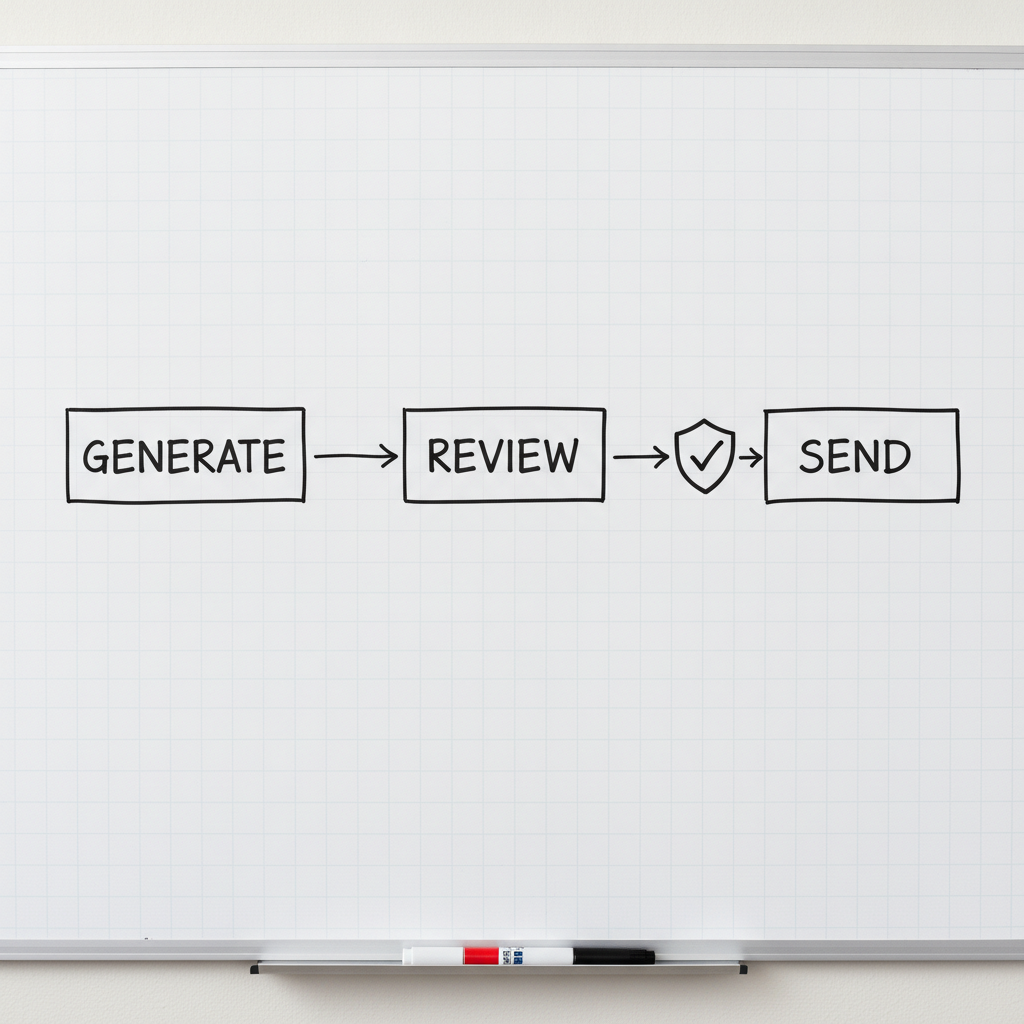
If you're using AI to generate anything that goes out automatically — emails, reports, customer-facing responses — build a human review step into the workflow before it sends. Automating AI output without a review gate is where costly mistakes happen at scale. Even a quick scan takes less time than cleaning up a bad client communication.
A note on tools that claim to solve this
Some AI tools advertise that they've "solved" hallucination through techniques like retrieval-augmented generation (RAG) — where the model pulls from a specific set of your documents rather than its general training. These approaches genuinely reduce hallucination risk in constrained settings. They don't eliminate it.
No current AI system is hallucination-proof. The honest answer from anyone selling you an AI solution is that good system design reduces the risk and contains the blast radius when it happens — it doesn't make verification optional.
Be skeptical of any vendor or consultant who tells you otherwise.
The upside of understanding this clearly
Here's what happens when you internalize this: AI becomes significantly more useful, not less.
When you know where to trust AI output and where to verify it, you stop being either naively dependent or reflexively skeptical. You use AI to do the drafting, the organizing, the first-pass research, the brainstorming — all the work where its speed advantage is real and its error risk is contained. And you apply your judgment at the specific moments where your judgment actually matters.
That's not a workaround. That's just good workflow design.
The businesses that struggle with AI are usually in one of two camps: they trusted it too much in the wrong places, or they dismissed it too quickly after one bad experience. Neither posture serves them.
The practical question for any business owner isn't "Is AI reliable?" It's "Reliable enough for what, and with what checks in place?" Answering that question well — for your specific workflows, your specific risk tolerance, your specific team — is where the real work of AI adoption lives.
If that's the kind of thinking you want applied to your business, let's talk. A single strategy conversation can clarify where AI is genuinely worth your investment and where the risk outweighs the return.