

If you've read anything about AI in the past six months, you've seen the word agents everywhere — one of the noisier items on the short list of AI trends worth your attention. Tech journalists love it. Software vendors love it more. "Autonomous AI agents will run your entire business!" is roughly the pitch.
Here's the honest version: agents are a real and meaningful step forward in what AI can do — but the gap between what's being demonstrated on stage and what works reliably in a real business is enormous right now. Understanding that gap is how you avoid wasting money and time.
This article is the plain-English breakdown: what an AI agent actually is, how it differs from the chatbot you've probably already seen, what agents can realistically do for a small-to-midsize business today, and where handing autonomy to software should make you nervous.
First: What's the Difference Between a Chatbot and an Agent?
Most business owners have now encountered a chatbot — you type a question, it answers. Maybe it's a customer service widget on a website, maybe it's ChatGPT. The defining feature is that it responds to you, but it doesn't go do anything. It's a very smart text box.
An AI agent is different in one critical way: it takes actions.
Where a chatbot answers the question "What's the status of order #1042?", an agent can look up order #1042 in your system, see that it's delayed, draft an apology email to the customer, check whether a replacement is in stock, and flag the issue in your project management tool — all without you touching it step by step.
The agent isn't just generating text. It's using tools, making decisions about what to do next, and working through a multi-step task with some degree of independence.
That's the core idea. Agents are AI that act, not just AI that answer.
How an Agent Actually Works (Without the Computer Science Degree)
Think of an agent as an AI with a to-do list and a toolbox.
You give it a goal — "Process all incoming vendor invoices and flag anything that doesn't match a purchase order." You also give it access to the tools it needs to pursue that goal: your email inbox, your accounting software, maybe a spreadsheet. An agent watching incoming invoices this closely is also well placed to catch AI-forged fake invoices before they get paid.
The agent then works through the task on its own: reading emails, pulling data, comparing numbers, making judgment calls based on rules you've set, and either completing the task or escalating to you when something's outside its instructions.
Technically, what makes this work is that modern AI models (like GPT-4 or Claude) are good enough to plan multi-step tasks and decide which tool to use at each step. Developers wrap those models in software that gives them the ability to take actions — sending an API call to QuickBooks, writing a row to a spreadsheet, firing off a Slack message.
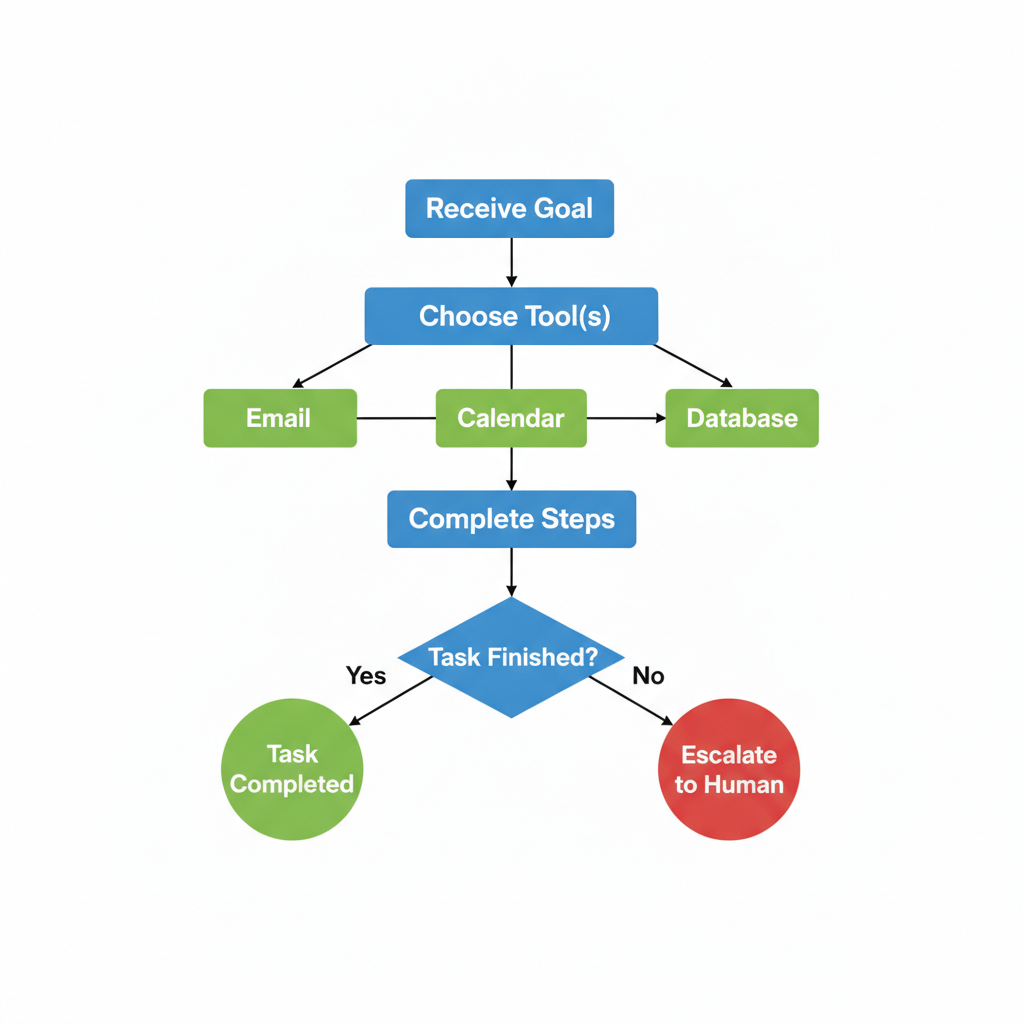
You don't need to understand the plumbing. What matters is the practical implication: AI can now do a sequence of things, not just say a sequence of things.
What AI Agents Can Actually Do for an SMB Today
Let's be specific. Here are the kinds of tasks where agents are working reliably in real businesses right now — not demo environments, not Fortune 500 IT budgets.
Structured, repetitive back-office work
This is the strongest current use case. If a task follows a predictable pattern — same inputs, same steps, same outputs — an agent can own it.
Examples that are working today:
- Invoice and document processing. An agent reads incoming invoices, extracts key fields (vendor, amount, due date, line items), matches them against purchase orders, and routes exceptions to a human reviewer.
- Lead routing and CRM hygiene. When a new lead comes in, an agent enriches the record with publicly available info, scores it against your criteria, assigns it to the right salesperson, and sends an intro email.
- Scheduling coordination. Agents can read email threads asking to schedule a meeting, check calendars, propose times, send invites, and update your CRM when a meeting is confirmed.
Internal knowledge work with defined scope
Agents can be surprisingly useful for structured research or summarization tasks that eat up time.
- Monitoring a set of competitor websites or news sources and delivering a weekly summary.
- Pulling data from multiple reports and producing a first-draft executive summary.
- Triaging support tickets and generating draft responses for a human to review and send.
Customer-facing workflows (with guardrails)
Agents can handle more sophisticated customer interactions than a simple FAQ chatbot — things like checking order status, processing a return request, or walking a customer through a configuration choice. The key phrase is with guardrails: the agent handles the routine cases, and humans handle anything outside the script.
Where the Hype Runs Ahead of Reality
Here's what the vendor demos usually don't show you.
Complex judgment calls don't go well
Agents are good at following rules. They're not good at exercising nuanced judgment — reading a tense customer email and knowing when to apologize versus escalate versus push back. They miss context that a human would absorb instantly. The more a task depends on reading the room, the less you want an agent doing it unsupervised.
They fail in unexpected ways
A human who hits an unexpected situation usually pauses and asks for help. An agent that hits an unexpected situation often does something — it just might be the wrong something, confidently. An invoice in an unusual format might get processed incorrectly. A misunderstood instruction might get executed in a way that makes sense to the AI and makes no sense to you.
This is the core risk: agents fail silently and at scale. If a person makes an error processing invoices, they make one error. If an agent is misconfigured, it can make the same error on every invoice before anyone notices.
The integrations are harder than the demos suggest
That impressive demo where an agent pulls from your CRM, updates your inventory system, and sends a Slack notification? Each one of those connections takes real setup. Most business software has APIs (ways for other software to connect to it), but connecting them reliably, handling edge cases, and keeping them working when vendors update their software is ongoing work. "Point and click" agent tools are improving, but they're not magic yet.
"Autonomous" is a dial, not a switch
The most useful deployment model for most SMBs isn't a fully autonomous agent that runs loose. It's a semi-autonomous agent that handles the easy 80% and surfaces the other 20% for a human. Setting that threshold correctly — knowing what decisions it's safe to automate and what decisions need a human in the loop — is where real judgment matters.
The Question You Should Actually Be Asking
Not: "Should we use AI agents?"
But: "Which specific tasks in our business are high-volume, rule-based, and expensive in time — and what's the cost of the agent getting it wrong?"
That second half matters as much as the first. Processing internal data summaries? Low error cost — a human reviews before anything goes out. Automatically sending customer refunds? High error cost — you want a human approving every one.
The risk/reward calculation looks like this:
| Task type | Volume | Error cost | Agent fit |
|---|---|---|---|
| Internal data processing | High | Low | Strong |
| Customer-facing info responses | High | Medium | Good with guardrails |
| Routine scheduling | Medium | Low | Strong |
| Financial approvals | Any | High | Human required |
| Nuanced client communication | Any | High | Human required |
Start with the top of that table and work down only when you've built confidence in what the agent actually does.
A Word on "Agentic" Products You're Probably Already Seeing
A lot of software vendors are slapping the word agent on features that are really just better automation or fancier chatbots. If a tool calls itself an agent but you can fully predict what it'll do in every situation, it's probably just automation with a rebrand. That's not a criticism — good automation is valuable — but it's worth knowing what you're buying.
True agents are distinguished by their ability to handle variability: different inputs, multiple steps, choosing between different tools depending on what they encounter. If a vendor can't explain specifically what decisions their "agent" makes and how it handles exceptions, ask harder questions.
This is exactly the kind of evaluation we do with clients before recommending any tool — not "is this AI?" but "does this actually solve the problem, and what breaks?"
The Honest Bottom Line
AI agents are not going to run your business. They're also not just another chatbot rebranded to sound exciting. They're a genuine step forward in what software can do — and for specific, well-defined tasks, they can save meaningful time and reduce errors compared to doing those tasks manually.
The businesses that will get real value from agents in the next 12-18 months are the ones that pick narrow, high-volume, low-risk tasks, build in human review where it matters, and resist the urge to automate everything at once. The ones that will waste money are the ones chasing the demo version.
That's a judgment call, not a software decision. It requires someone to look at your specific workflows, your error tolerance, and your actual cost structure — before you buy anything.
If that kind of clear-eyed evaluation is what you're looking for, let's talk. A strategy call is a good place to figure out where agents would actually move the needle for your business — and where they'd just add complexity.